You may want to orient the joints in a hierarchy for a variety of reasons:
여러 가지 이유로 하이라키에서 조인트의 orient를 조정하고 싶을 수 있습니다.
Your motion capture skeletons have strange joint rotations. 모션 캡처 스켈레톤의 조인트 회전값이 이상합니다.
You are building a skeleton from scratch and want to adjust the arms to bend at a particular angle. 처음부터 스켈레톤을 만들고 있으며, 팔이 특정 각도로 굽어지도록 조정하고 싶습니다.
You have modified your skeleton, and now the angles of your joints are off. 스켈레톤을 수정한 후, 조인트 각도가 틀어졌습니다.
KineFX has several tools and methods for manipulating joint orientations. KineFX는 조인트 Orientation을 조정하기 위한 여러 가지 도구와 방법을 가지고 있습니다.
Automatically orient joints
조인트를 자동으로 정렬하기
For simple joints chains, you can automatically orient joints using theOrient Joints SOPnode. 단순한 조인트 체인의 경우에는, Orient Joints SOP 노드를 사용하여 조인트의 방향을 자동으로 설정할 수 있습니다.
Connect the output of the Skeleton node to the input of the Orient Joints node. Skeleton 노드의 아웃풋을 Orient Joints 노드의 인풋에 연결합니다.
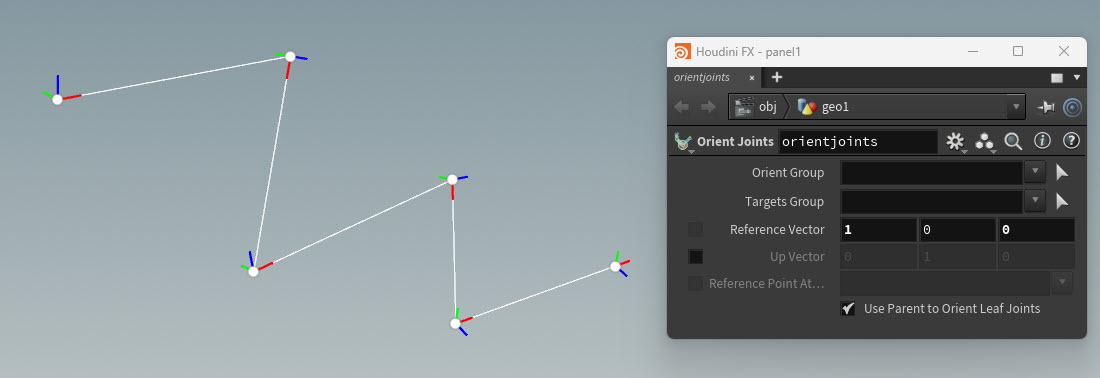
In the parameter editor, specify aReference Vectorfor the orient operation. 파라미터 에디터에서 Orient 작업에 사용할 Reference Vector를 지정합니다.
You can also set the direction of the Up vector by turning on theUp Vectorparameter. Up Vector 파라미터를 활성화하여 Up 벡터의 방향도 설정할 수 있습니다.
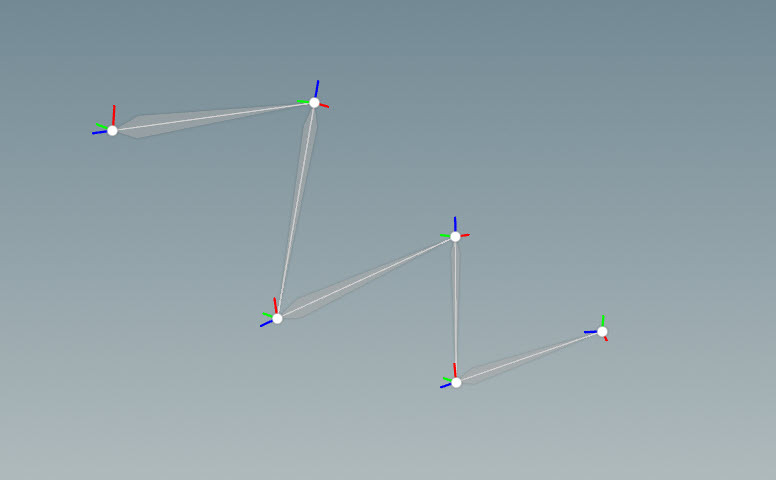
X-axes now point down the joint chain 이제 X축이 조인트 체인을 따라 아래 방향을 향합니다.
The joints in your joint chain will automatically orient to theReference Vector(andUp Vector) you specify. 조인트 체인의 조인트들은 네가 지정한 Reference Vector(그리고 Up Vector)에 맞춰 자동으로 방향이 설정됩니다.
This sets the direction of the joint axes that points toward the child joint.
이 설정은 자식 조인트를 향하는 조인트 축의 방향을 설정합니다.
For example, if you want to orient the joints in your joint chain so that their X-axes look at their child joints, then specify aReference Vectorof1in the X-axis field. 예를 들어, 각 조인트의 X축이 자식 조인트를 바라보도록 정렬하고 싶다면, Reference Vector 값을 1로 지정합니다.


댓글