개요
후디니의 Legacy 렌더러인 Mantra 대신, Karma 렌더러를 사용하기 위해서는 USD 워크플로우에 익숙해져야한다.
이 USD 워크플로우에 대한 간략한 설명이다.
내용
솔라리스(Solaris)와 LOPs는 후디니에서 라이팅, 룩뎁, 레이아웃, 렌더링 작업을 위한 USD 워크플로우다.
이 둘의 차이는 무엇인가?
솔라리스는 USD 씬을 다루는 작업 환경(Context)이고,
LOPs는 그 환경에서 씬을 구성하고 조작하는 데 사용되는 노드들이다.
(LOPs는 "Lighting Operators"의 약자이다)
예를 들자면,
지오메트리 작업을 SOPs(Surface Operators)로 하고,
시뮬레이션 작업을 DOPs(Dynamic Operators)로 하는 것과 동일한 것이다.
참고사항
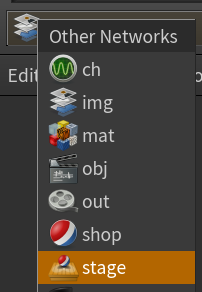
stage가 솔라리스 워크플로우를 진행할 수 있는 공간이며,
여기서 LOPs를 생성하고 조작할 수 있다.
추천 튜토리얼
공식 튜토리얼
https://youtube.com/playlist?list=PLXNFA1EysfYlr6XQd2avsFfoBcDpuoH7R&si=Jvksqb0ZvWsebs6u
Houdini Solaris Essentials
In this video series by Adam Swaab, you will learn how to bring in an animated scene from the OBJ/SOPs context, into LOPs and render it out with Karma and Ma...
www.youtube.com
https://www.sidefx.com/solaris-essentials-lops-karma-matx/
전체 워크플로우를 가장 잘 설명한 Rohan Dalvi 님의 튜토리얼. (공식 사이트 비메오, 유튜브 내용 동일)
하지만, 구버전이라서 현재 시점(2026.01) 기준 비추천
https://www.sidefx.com/tutorials/solaris-and-lops/
Solaris and LOPS | SideFX
In this lesson, you will be introduced to Houdini's new context for lookdev, layout and lighting called LOPS. This new suite of tools is also known as Solaris and works together with the new Karma Render (beta).
www.sidefx.com
렌더링 설명 위주
USD 설명 위주
https://youtu.be/hBYSHFRnFlo?list=PLXNFA1EysfYklJkoKc-35g4SVM2YOflWD
'이펙트 (FX) > 이펙트 팁 : Houdini' 카테고리의 다른 글
| [Houdini] 노드 형태, 색상 기본값 변경 팁 (Node Shape, Color, 매우 쉬움) (0) | 2025.08.08 |
|---|---|
| [Houdini/Copnet] 마스크 왜곡하는 법 (Distort, Old Copnet, 후디니 20.0 이하) (0) | 2025.08.07 |
| [Houdini] 후디니 씬 뷰 오류시 리셋하는 쉘프툴 (파이썬, 뷰포트, Scene View) (0) | 2025.08.05 |
| [Houdini] 쉘프툴 중첩 사용시 새 Dopnet에 세팅하는 법 (0) | 2025.07.21 |
| [Houdini] 시퀀스 이미지 프레임 패딩 넘버 조절하는 법 (1을 101부터 재생) (0) | 2025.06.19 |


댓글