개요
후디니에서 Flip 결과를 Meshing할 경우 생기는 고질병인 잔떨림 해결법을 알아본다.
결론적으로 21버전부터는 AI 기반의 새 방식이 도입되면서 문제가 상당 부분 해소되었다.
내용
1. Particle Fluid Surface 공식 문서
SideFX — Particle Fluid Surface SOP
이건 단순 노드 레퍼런스가 아니라 SideFX가 아예 "flickering을 줄이려면 이렇게 해라"라고 별도 팁을 적어놨다.
권장 사항은 크게 세 가지다.
- FLIP Solver의 Reseeding OFF
- Average Position + Limit Refinement 또는 Spherical 중 방법 선택
- Dilate → Smooth → Erode
- Adaptivity = 0
특히 Adaptivity 0에 대해서 SideFX가 명시적으로 시간에 따른 mesh consistency를 높이고 polygonization 변화 때문에 normal이 흔들리는 것을 피한다고 설명한다. (SideFX)
그리고 Filtering도 꽤 체계적으로 설명되어 있다. 단순 Smooth가 아니라:
Particles
   ↓
Surface SDF
   ↓
Dilate        ← 작은 구멍/분리 제거
   ↓
Smooth        ← particle noise 제거
   ↓
Erode         ← Dilate로 부푼 체적 복원
   ↓
Final Smooth
   ↓
Polygonize
라는 식이다. 게다가 Velocity/Vorticity로 smoothing mask를 만들 수 있다. 즉 잔잔한 곳은 강하게 smooth하고 splash 부분은 디테일을 보존할 수 있다. (SideFX)
원문은 아래와 같다.
- Turn off Reseed Particles on the FLIP Solver to avoid introducing new particles during the simulation.
- If using the Average Position surfacing method, turn on Limit Refinement and leave the iterations at 0 or switch to the Spherical method. In either case you will probably need additional smoothing on the Filtering tab, using the Dilate, Smooth, and Erode parameters.
- Disable adaptive polygon meshing by setting Adaptivity to 0. This setting will create a heavier mesh, but the mesh will be more consistent over time and avoid variations in the normals from changing polygonization.
2. Houdini 21 이상 신기능 활용
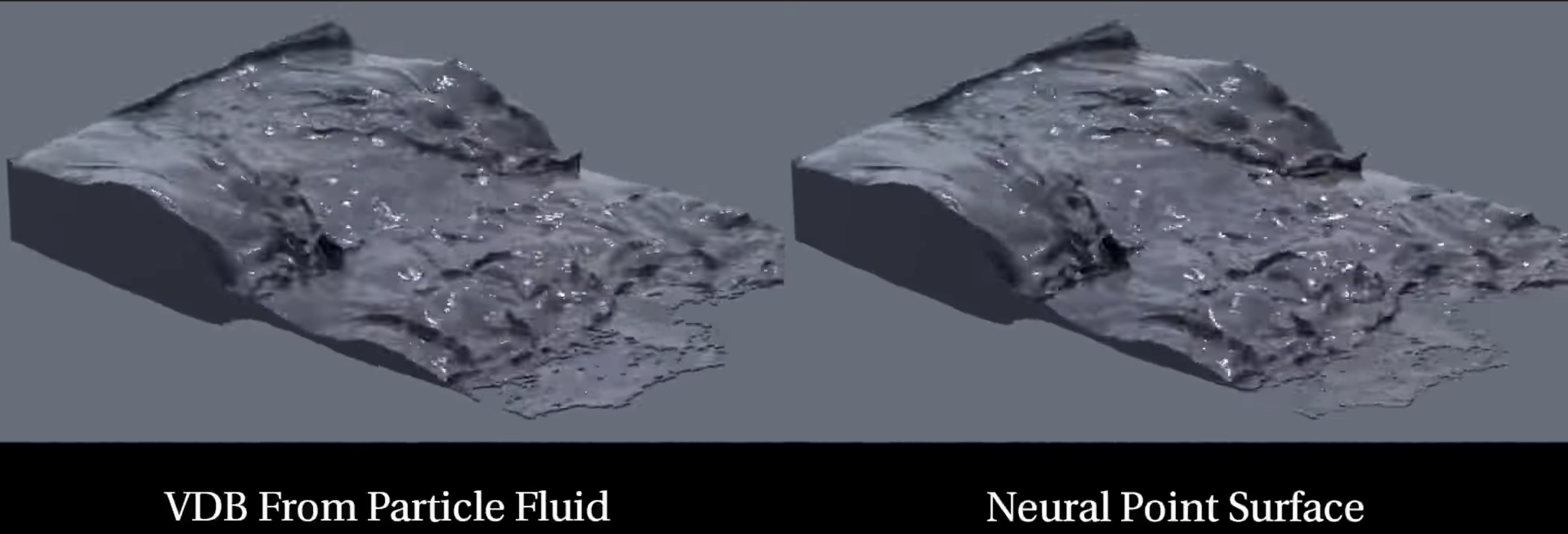
Neural Point Surface → Liquid
SideFX — Neural Point Surfacing
SideFX가 Liquid 모델을 설명하면서 정확히 이렇게 정의한다.
smooth curved surfaces를 유지하면서 wave의 sharp transition을 보존하고, thin sheet와 droplets를 temporally stable하게 연결하도록 학습되어 있다. (SideFX)
기존 방식:
FLIP particles
      ↓
Average Position / VDB From Particles
      ↓
Dilate
      ↓
Smooth
      ↓
Erode
      ↓
Mesh
H21:
FLIP particles
      ↓
Particle Fluid Surface
      ↓
Method
   Neural Point Surface
      ↓
Neural Model
   Liquid
      ↓
Mesh
그리고 이게 MPM 전용이 아니다. 현재 Particle Fluid Surface SOP 자체에 Neural Point Surface가 들어가 있어서 FLIP에서도 쓸 수 있다. (SideFX)
SideFX도 기존 VDB 방식보다 flat region의 원치 않는 noise를 없애면서 wave edge 같은 high-frequency detail은 살리는 것을 장점으로 보여준다. (SideFX)
단, Neural Point Surface는 GPU 사용이 사실상 전제다. NVIDIA에서는 CUDA 12.8 + cuDNN 9.x를 권장하고 CPU fallback은 매우 느리다고 SideFX가 명시한다. (SideFX)
3. 실제 현업 사용자들의 flicker 논의
SideFX Forum — FLIP Splash: Particles jittering/flickering
이건 2024년 글인
사용자가 시도한 방법이:
reseed particle age → pscale fade-in
curvature based attribute blur
VDB Dilate
VDB Smooth × several
등이고, Framestore의 Tomas Slancik 답변은 요지가:
meshing 자체가 jitter filtering에 큰 역할을 하며, 작은 스케일 fluid에서는 개인적으로 reseeding을 끄고 particle separation을 사용하는 편이라는 것이다. 질문자는 이후 작은 pscale + 여러 번의 dilate/smooth로 usable mesh를 얻었다고 한다. (SideFX)
결론
A. 기본
Particle Fluid Surface
Average Position


B. Traditional Stable
Particle Fluid Surface
Average Position
Adaptivity = 0

+ Dilate
+ Smooth
+ Erode

+ Velocity/Vorticity Mask
  → 느린 영역만 강하게 smoothing


C. H21
Particle Fluid Surface
Neural Point Surface
Liquid
Adaptivity = 0


댓글