개요
1.x 버전은 상업적 사용도 무료로 가능한 유용한 캡처 프로그램 Snipaste을 소개한다.
다른 캡처툴보다 기능도 좋고 가볍다.
(2.x 버전은 개인만 무료로 사용 가능)

방법
아래 사이트 접속 후 Previous Versions 눌러서 다운로드
Snipaste
Boost your productivity with Snipaste Snipaste is a simple but powerful snipping tool, and also allows you to pin the screenshot back onto the screen. Download and start the application, press F1 to start snipping, then press F3 to paste it as a floating w
www.snipaste.com

팁 : Preferences 설정
시작시 자동 실행
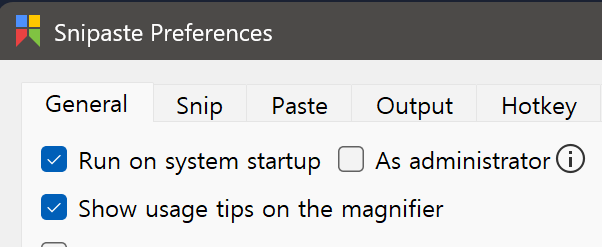
자동 업데이트 끄기

단축키 설정 추천
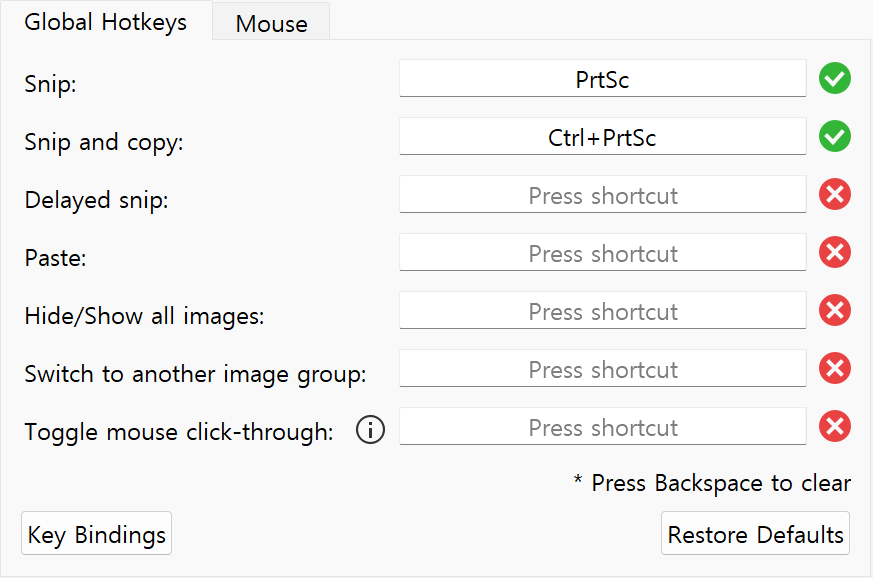
팁 : 단축키
프로그램이 활성화된 상태에서 , 또는 . 를 눌러서 히스토리 전 후 왔다갔다 가능
캡처를 미리 연속으로 한 후에 저장하는 것이 가능함
라이센스 정책
최종 사용자 사용권 계약서
Feedback & wiki for Snipaste https://snipaste.com. Contribute to Snipaste/feedback development by creating an account on GitHub.
github.com
'기타' 카테고리의 다른 글
| [기타] 무료 AI 자막추출 프로그램 Buzz 소개 (설치 >> 사용 >> 제미나이로 요약) (0) | 2026.01.17 |
|---|---|
| [기타] Udemy 베타 UI 끄는 법 (유데미) (0) | 2026.01.03 |
| [윈도우] 가상 데스크탑 사용법 (멀티 태스킹, 데스크톱) (0) | 2025.12.04 |
| [기타] 크롬 번역 확장 프로그램 추천 : Language Reactor (자막번역, 단어 번역 등) (0) | 2025.10.16 |
| [기타] 크롬 흰화면 무응답 오류 해결법 (Chrome, Google) (0) | 2025.08.26 |


댓글